A supplier sends an invoice. Your finance team enters a bill. These can be two records of the same payment request, with different internal identifiers. Before creating another entry or paying again, compare the supplier, original invoice number, currency, amount and due date.
The practical invoice vs bill distinction is usually about perspective: the seller requests money; the buyer records money owed. The document’s label alone does not tell you when payment is due or whether it has been received.
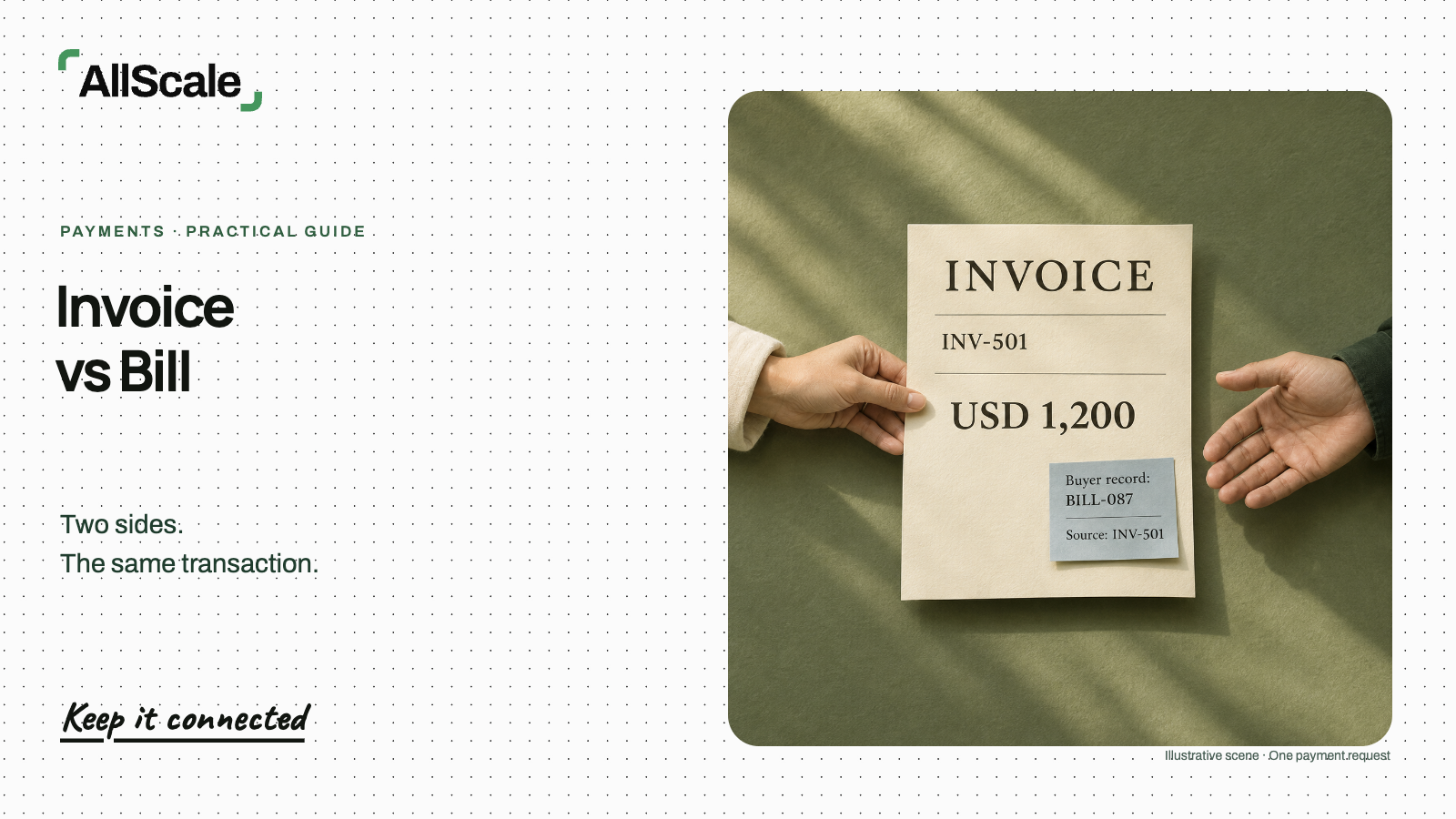
Consider one illustrative service invoice for USD 1,200, due on 16 November 2026. The supplier calls it INV-501; the customer records it internally as BILL-087. After USD 500 is confirmed received and applied, USD 700 remains open. Two names have not created a second USD 1,200 obligation.
Identify which side of the transaction you are on
The seller issues an invoice to request payment. The buyer may call that supplier invoice a bill when entering it into their payment workflow. Xero’s invoice guide describes this common distinction from the buyer’s perspective. Terminology varies between businesses and software, so use the actual document to establish what is being requested.
| What to check | Seller’s invoice record | Buyer’s bill record |
|---|---|---|
| Role | Supplier requests payment | Customer records the request |
| Payment direction | Money to receive | Money to pay |
| Reference | Supplier invoice number | Internal bill ID linked to that number |
| Amount | Amount invoiced and remaining receivable | Same obligation and remaining payable |
| Next action | Share the request and track receipt | Check, approve and arrange payment |
“Bill” does not automatically mean payment is due immediately. “Invoice” does not automatically mean the customer has 30 days. Read the agreed terms and the specific due date. If the invoice and your payment schedule disagree, resolve the discrepancy before approval.
In a shared inbox, a useful first question is: “Is this a new purchase, a correction, or another copy of a request we already hold?” That question does more to prevent duplicate work than deciding which noun everyone should use.
Match the reference, amount and due date
Keep the supplier’s original invoice number alongside your internal ID. An internal ID helps your team find its record; the supplier needs its own reference to identify the request. Replacing one with the other makes the next conversation harder.
Here is the same illustrative transaction viewed from both sides. Harbor Design is the supplier, and Cedar Studio is the customer. No fees, credits or other adjustments apply in this example.
| Field | Seller record | Buyer record |
|---|---|---|
| Supplier | Harbor Design | Harbor Design |
| Customer | Cedar Studio | Cedar Studio |
| Identifier | INV-501 | BILL-087, linked to INV-501 |
| Original request | USD 1,200 | Same USD 1,200 |
| Due date | 16 November 2026 | 16 November 2026 |
| Payment confirmed and applied | USD 500 | Same USD 500 |
| Remaining balance | USD 700 receivable | USD 700 payable |
USD 1,200 requested
USD 500 received and applied
USD 700 open
Source reference: INV-501
Same USD 1,200 request
Same USD 700 open
Illustrative records of one transaction. USD 1,200 − USD 500 = USD 700; the two records are not added together.
Check the service period or order details as well as the total. Two legitimate invoices can have the same amount, and different suppliers can use identical invoice numbers. A match on USD 1,200 alone is insufficient.
If two internal entries appear to represent INV-501, pause the extra payment instruction while the owner checks them. Retain the source document, approval history and payment evidence. Once the duplicate is confirmed, use your accounting system’s correction process to cancel or consolidate the duplicate entry without losing the history. Check whether either entry already has a scheduled payment.
Avoid creating a second request by renaming it
When a client asks, “Can you send the bill?”, they may simply need the invoice again. Send the existing document or its agreed payment link, with enough context to identify it:
This is invoice INV-501 for the same USD 1,200 payment request. USD 500 has been received and applied, leaving USD 700 due on 16 November 2026.
Use that payment-status wording only when your records support it. If no payment is confirmed, state the current open amount instead.
Duplicate requests often arrive through ordinary office workflows:
| What arrives | What to check before entering it |
|---|---|
| The same PDF attached again | Compare supplier and invoice number with the existing record |
| A file renamed from “invoice” to “bill” | Compare the contents; a filename change does not establish a new obligation |
| A colleague’s forwarded email | Open the original attachment and check whether it is already registered |
For an actual correction, identify what changed and which version is current. Keep the revised document connected to the original, and make sure the customer knows how it affects the amount due. Where a credit note is required by the applicable process, retain it as a linked adjustment. Renaming an invoice is not a substitute for documenting a correction.
Check payment evidence separately
Neither “invoice” nor “bill” proves payment. An invoice requests money; a receipt records payment received. Compare invoices and receipts if you need to choose which document to send. For the balance itself, check the transaction record and the amount applied to this specific request.
A forwarded invoice may show the original USD 1,200 even after a partial payment. Before paying that total, check the existing payment’s date, reference, currency, amount and status. In this example, USD 500 has been confirmed received and applied to INV-501, so only USD 700 remains.
A submitted transfer still awaiting confirmation needs follow-up. Funds received but not yet allocated also need follow-up. Keep those statuses visible rather than assuming that an unchanged invoice PDF means no payment occurred. Ask the supplier to confirm which transaction has been applied before arranging another payment.
Use one reference through the next step
Give the person approving or arranging payment a short handoff that connects both records:
- Source reference: supplier invoice INV-501, with the current document attached or linked.
- Internal ID: BILL-087, linked to INV-501.
- Payee: Harbor Design, with receiving details checked through the agreed process.
- Currency and amount: USD 1,200 originally requested; USD 700 remaining, due 16 November 2026.
- Status: USD 500 confirmed received and applied; the remaining USD 700 is open.
Keep the supplier’s reference in the payment instruction where the payment method supports it. Retain your internal bill ID in your own record. For the checks before submitting funds, follow the guide to paying an invoice.
After payment, share the transaction reference and allocation details with the supplier. Keep that message with the payment evidence so the next person can understand which invoice it covers. Ask for confirmation if receipt or allocation remains unresolved.
Suppliers can create a stablecoin invoice with AllScale and share its payment link. The buyer maintains its bill record through its own process. Sharing a link does not replace the buyer’s approval steps or automatically connect separate accounting records.
Frequently asked questions
Can the bill ID differ from the invoice number?
Yes. BILL-087 can be an internal identifier for supplier invoice INV-501. Keep both references connected, and use the supplier’s number when discussing the request with them.
Does a bill always need immediate payment?
Read the agreed due date and terms. The label does not establish the deadline. Check that the date in your internal record matches the document and agreement.
Should I issue another document when a client asks for the bill?
For the same request, share the existing invoice or agreed payment link. Create a revised document only when a real correction requires it, and preserve its relationship to the original.
Does either label prove payment?
No. Check payment evidence and allocation separately. The request may be unpaid, partly paid or fully paid; its title does not establish its current balance.